How it works
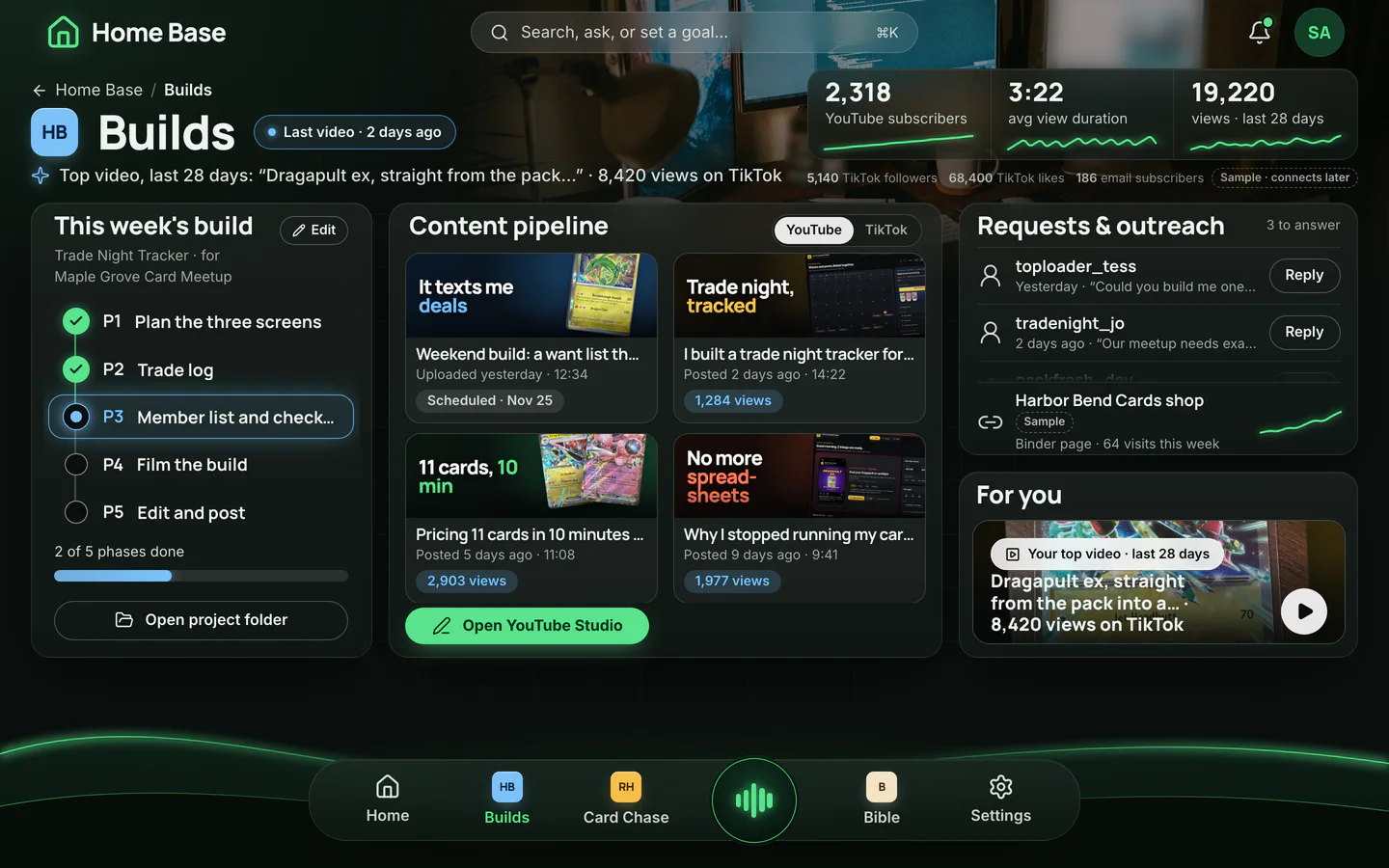
A home base is a small app of your own that pulls your side hustle into one place. One home screen shows what needs you today. Behind it are worlds, one for each part of your work, filled with your real numbers. It drafts the busywork, and you decide what goes out.
What a home base is
One home screen
The first screen you open. A greeting, one line on what needs you today, and a tile for each world with the number that matters there.
Worlds inside it
A world for each part of your work: your videos, your stock, your clients, your training plan. Each one is a full room you can step into.
A “Needs you” list
The few things from all your worlds that need you today, in order, each with one button. Not now hides one until tomorrow.
Your real numbers
Subscribers, views, followers and comments come in from YouTube and TikTok; eBay searches come from your cards. You don’t copy anything over.

A morning with it
Here’s Sam, the made-up owner in my demo, who sells cards and posts videos about them.
Step 1: Open Home
“Good morning, Sam. 3 build requests to answer, 3 comments to answer and 2 cards need a max price.” One line instead of five apps.
Step 2: Tap Reply
Builds opens on the comments that ask for something. A reply is already drafted for each one. Sam tweaks it and posts it on YouTube.
Step 3: Set a price
Card Chase shows the two wanted cards with no max price yet. Sam adds them, so a good deal stands out when one comes up.
Step 4: Read
Today’s reading is three minutes. Then the Needs you list is empty, and the day can start.
Where the numbers come from
From the places you already use, once you connect them. Connections are read-only: your home base can look, but it can’t post, reply or list anything for you.
YouTube
Subscribers, views, your latest videos and their comments, through a sign-in that can only look, never post.
TikTok
Followers, likes and your latest videos, read-only.
eBay
A search for every card, built from its details. In mine, the auction list is a sample until eBay is connected.
What you add
Your stock, this week’s project and your notes, saved on your own computer.
Which services yours connects to depends on your work and on what each service allows. Some only allow a link, and that’s fine too.
Why it helps
One place to start your day
Open one screen and you know what needs you. No checking five apps to find out.
Less app-hopping
Your numbers, comments, stock and plans sit side by side. When you do need YouTube or eBay, one button takes you there.
It drafts the busywork
Replies and reminders are written from your own information, ready for you to approve, tweak, or skip.
How I build one
Every home base I make is built around its owner. It can start from mine, from one of two simpler styles, Display Case or Editorial Grid, or from nothing. See the styles.
You tell me
- What you do and what’s hard to keep track of.
- The parts of your work that could each be a world.
- Which services you use, such as YouTube, TikTok or eBay.
- Your name, logo and colours, if you want them used.
You get
- A written plan of the worlds, screens and connections, agreed before I start.
- Your home base, with a phone layout where it’s included.
- Help connecting your accounts.
- A walkthrough of how to use it and back it up.
Steps
- Tell me about your work.
- We agree what it does.
- I build it and go through it with you.
How it runs
This is how mine works today. Yours may differ, and we agree how before I start.
- On your computer, in the browser. Nothing to install from an app store, and no account to sign up for.
- Your information stays with you. It’s saved on your own computer. Nothing is sent to me.
- Connections are optional and read-only. You choose what to connect, and it can only look.
- You post. Replies are drafted inside; you post them yourself.
Want one?
Tell me what you do and what’s hard to keep track of. I’ll tell you honestly whether a home base would help.